Simulation end on specific location **Need help: How to make a character fall to a specific area using Ragdoll Dynamics**

In my scene file, the character is running and gets hit by a car, but after the hit I want the simulated character to land in a specific area (i added green box ,that the target area). How can I achieve that? I am attaching the scene file along with this message. Could you please explain how I can achieve this and which option I should use?

CarHit.zip (603.4 KB)

Hi @Dicco, thanks for posting.

Would it be possible to include a video/screen recording/playblast of your example? And could you upload the .ma file as opposed to .mb? We are unable to open the binary .mb.

CarHit.zip (715.7 KB)
Ma file attached ( (i added green box ,that the target area)

Thanks! Now the only thing missing is a screenshot or video of what you’ve tried so far. Where does the character land at the moment, and what have you tried to get it landing elsewhere?
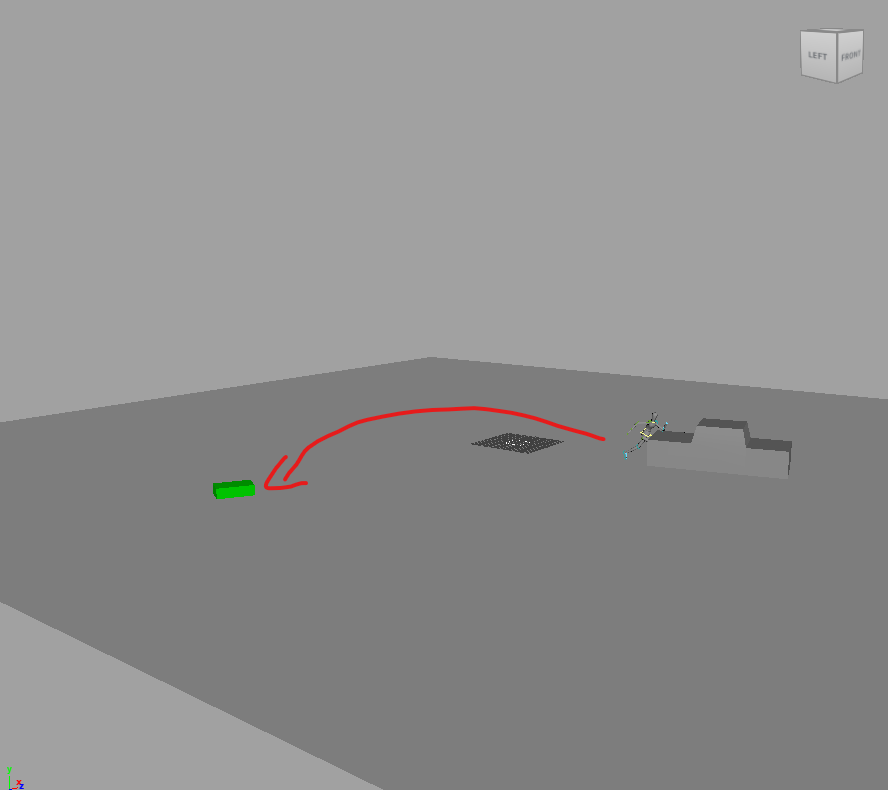

this is the target spot

Aha, okay. Try this.

  1. Keyframe the start position your character on frame 1
  2. Keyframe another position on frame 2, to determine the speed and direction of your character
  3. Animate the Behaviour attribute on the rGroup containing your character from Animated to Simulated over frames 1 and 2.

By starting off as Animated, it will inherit the direction and velocity from your animation and take off in simulation once it becomes Simulated.

From there, you can tune the keyframe at frame 2 until it lands where you’d like.

You can use Ragdoll → Edit → Cache while standing on the future frame, to see the effect of your changes without changing the timeline.

Post what you come up with, and we can carry on from there!