i have had more than one occasion where the markers will just completely dissapear (not just visibly, functionally, snap to sim stops working too) reloading the file doesnt help, but all i know it is has something to do with saving and loading/ undoing/ or switching your armature to a new animation? it has happened in all of those cases. attached is a console screenshot with some errors

Thanks @cursed !
The error message seems incomplete, can you capture to the end if possible?
You mean saving/loading .blend file, or Ragdoll’s .rag?
I need to know more about this step, like, how exactly did you switch animation? Would save us some time if you can list out the key steps, or a video recording would be even better!
saving and loading .blend, and actually its just loading its never dissapeared after saving
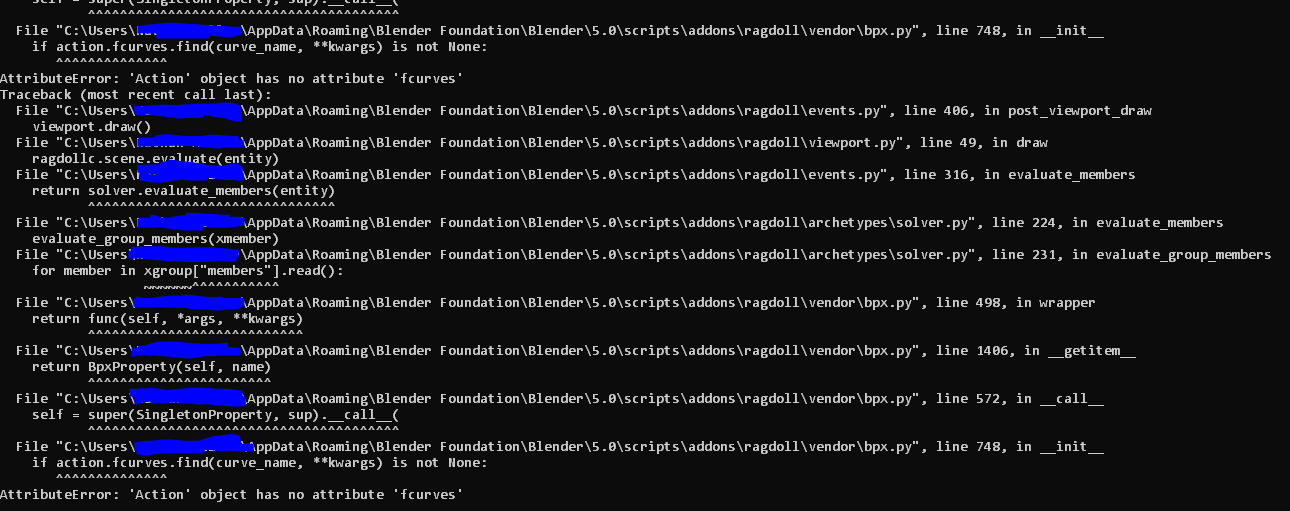
heres the rest of the console, and i cant really give an example of the undo thing right now as my markers arent there, i could maybe go get another file with ragdoll but at the moment im only using it on one project
the errors also seem to be looping or refreshing every frame? not changing though

when i say changing animation i mean on this in the action editor by the way
1 Like
Awesome, that really helps 
I will try reproduce the error on my end, and let you know how it goes.
ok thank you
I was able to reproduce the error with following steps:
- In a new scene, assign marker to a cube
- Create a keyframe to a property of that new marker, e.g. Rotate Stiffness.
- Save the scene and then open it again
- Marker disappeared and the same error can be found in System Console
A quick fix I found is to Unlink Action for each marker, and then link it back. Can you try this?
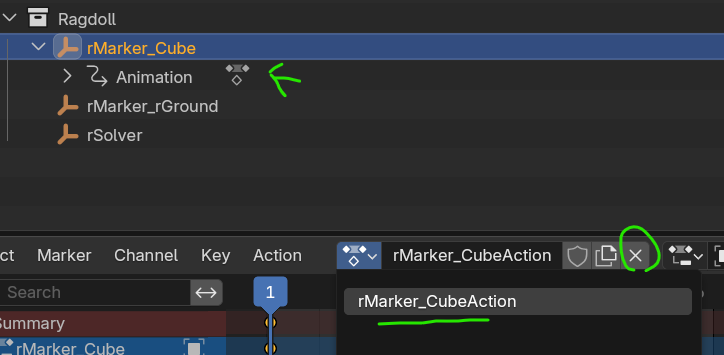
1 Like
yes this worked!!! thank youuu
Awesome, good to hear that!
We will try make a fix release for this ASAP. Will let you know
1 Like
Hi @cursed , we have got a fix release. Before we have our official download page updated, please get this new release here 
Thanks for reporting the bug!
1 Like
and thank you for the help 