I am following:
It’s a great question and one I’d like to dive deep into as soon as we’re back from SIGGRAPH. Stay tuned in this thread.
In a nutshell, I’ve had the most success treating cloth - like capes - as a low-poly mesh. Where each vertical polygon edge is a joint chain with assigned markers. To keep it together horizontally, you either may not need to - it depends on the action - or it does in which case I’ve used Distance Constraints. But nowadays, with the release or 2022.07.20, I’d experiment with t…
When I open any of the scenes, the results look nothing like in the gifs. I know that the tutorial is probably older than the latest iteration of the tool, but the sims are wildlly different making it nearly impossible to learn from.
I am using maya 2022 and ragdoll 2025.10.06.
Hi @treeperson
Yes, Ragdoll has changed so much since then! The scene needs some tweaking to get similar simulation output. Have you tried the script at the end of that thread?
setAttr "_:rSolverShape.sceneScale" 1;
setAttr "_:rSolverShape.gravityY" -98.2;
As a heads-up for future readers:
In the current version of Ragdoll (2024.07.01), user @Hombu in the Discord discovered that the example scene needs a minor tweak in order to run.
setAttr "_:rSolverShape.sceneScale" 1;
setAttr "_:rSolverShape.gravityY" -98.2;
Namely, the Distance Constraint doesn’t seem to respect scene scale and misbehaves as a result. Without scene scale, it reproduces the above examples.
This is considered a bug and will be fixed in the upcoming version.
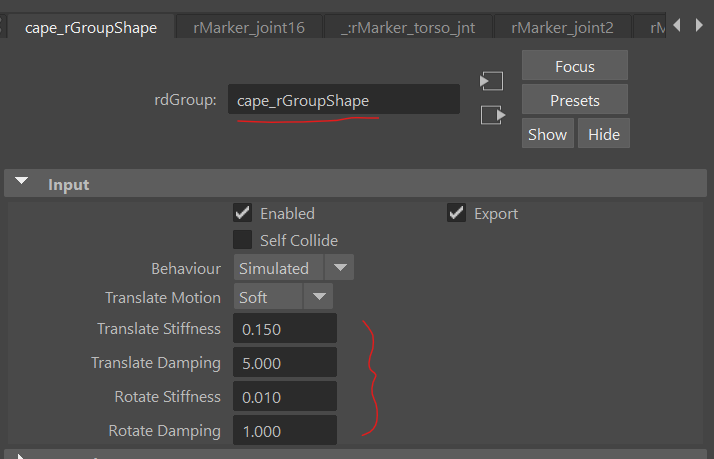
Other than running that MEL script, you may also try tweaking these cape_rGroup attributes
Wow, yeah. That really brought it all together.