Hello there!
Im just trying to export my ragdoll setup so i can use it in other files, but im getting this big error, which I unfortunately dont know how to debug 
Python: Traceback (most recent call last):
File “AppData\Roaming\Blender Foundation\Blender\4.2\scripts\addons\ragdoll\operators_init_.py”, line 326, in new_execute
return subclass_execute(self, context)
^^^^^^^^^^^^^^^^^^^^^^^^^^^^^^^
File “AppData\Roaming\Blender Foundation\Blender\4.2\scripts\addons\ragdoll\operators\io.py”, line 62, in execute
parser.export(self.filepath)
File “AppData\Roaming\Blender Foundation\Blender\4.2\scripts\addons\ragdoll\parser.py”, line 52, in export
data = json.loads(ragdollc.registry.dump())
^^^^^^^^^^^^^^^^^^^^^^^^
File “AppData\Roaming\Blender Foundation\Blender\4.2\scripts\addons\ragdoll\events.py”, line 328, in pre_export
xdest = scene.source_to_object(xdest)
^^^^^^^^^^^^^^^^^^^^^^^^^^^^^
File “AppData\Roaming\Blender Foundation\Blender\4.2\scripts\addons\ragdoll\scene.py”, line 355, in source_to_object
raise bpx.ExistError(“Could not find the object for %s” % source)
ragdoll.vendor.bpx.ExistError: Could not find the object for <bpy_struct, RdPointerPropertyGroup(“”) at 0x000001C11A0EF120>
Hey @iSivert !
By looking at where the error occurred, it is possible that a marker has lost its connection to a bone. Was there any bone been deleted?
Hey!
Yeah, it is possible because i was changing parts of the rig. But i redid the parts that i changed in ragdoll aswell.
So even after you also updated ragdoll for those changed bones, you still get that error while exporting?
Yeah, its possible that i missed something tho. Also i just opened the file and for some reason all of the markers are dead  I think ill just redo the setup for good measure

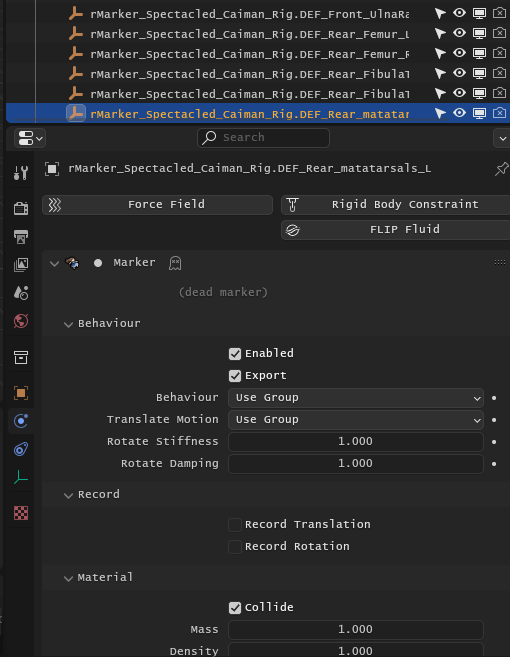
By “dead”, you mean they are no longer visible in viewport? Did you see any error messages?
By the way, I can confirmed that the error you got can be reproducied by these steps:
- Make armature
- Assign markers
- Delete a bone
- Export physics and see the error
But cannot see any “dead” marker by saving the same file and reopen it.
glad you found it! not sure what happened to be honest after i wrote the message here yesterday i just closed the file - today i opened and they are dead
Ah, I see!
Yeah that “dead marker” means the bone or object that the marker was originally assigned to, has been deleted.
Maybe those markers were just residue from previous rig redo? Or for some reason, the entire rig was not loaded or gone?
Hmm, i think i know what the issue could be. I had to make a change to the rig, and i created another armature where i basically redid the tail - i then later joined the two armatures, so i think that could be the issue
Hey @iSivert
We got another release for you, please get it here and have a try.
This new release includes fixes for following bugs:
- Physics Export failed if any bone or object that has marker assigned has been deleted.
- Physics Export failed if any marker object was deleted.
And…
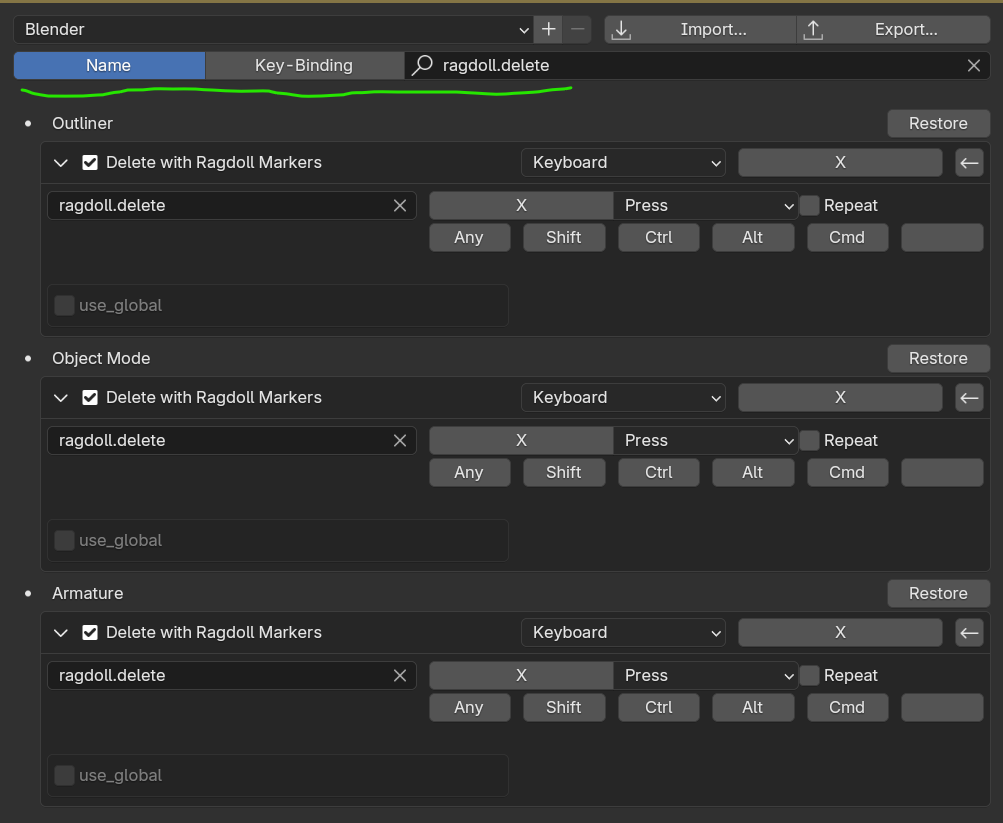
Since your workflow involves many rig changes, and lots of “dead marker” were left in your scene. To make things cleaner, we added a new operator ragdoll.delete for deleting object/bone and their assigned markers in one undo step.
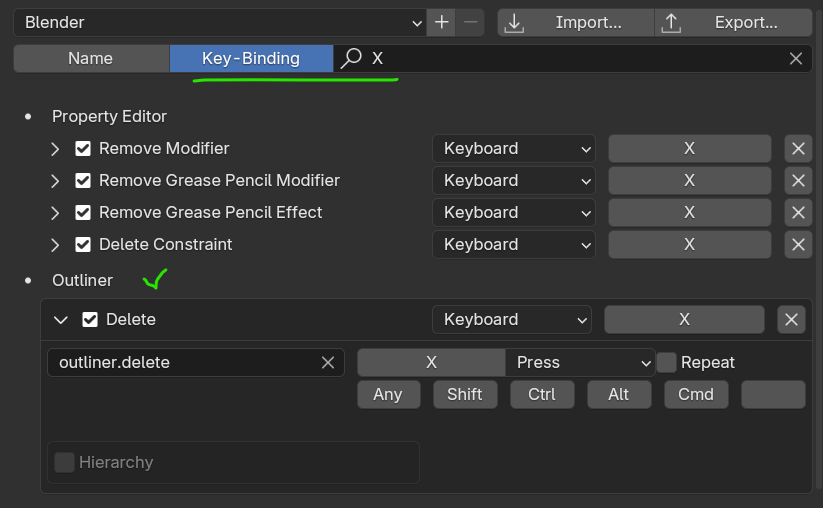
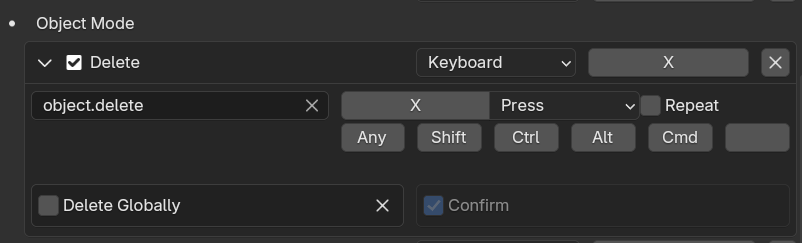
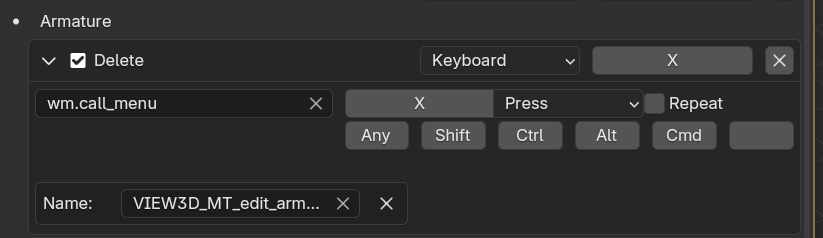
Let’s see if using this custom operator for object/bone deletion helps. Please try assign a hotkey for this ragdoll.delete operator, or just assign Blender’s default object deleting hotkey X to it.
For example, try replacing Outliner > Delete operator.
And Object Mode > Delete
And Armature > Delete, for bone delete or dissolve.
Once done, you should see something like this.
1 Like
Hello! Sorry for the loong delay, ive been busy with other work. I added your suggestions thanks alot!
Another little issue i found - i have a tail rig on one of my characters where i want to have some sine fuctions which im making with an ik spline setup - so i added the ragdoll to the def bones which are getting the transforms from IK and the FK chain - so that i always get the right ragdoll movement - buut for some reason i cannot import this setup into another linked file, is it because thye are def bones? When i import the physics everything is great except the tail.